
Find your true aim speed with this eDPI calculator. Enter your DPI and in-game sensitivity to convert instantly. Built for players searching for an edpi calculator, or edpi converter.
eDPI Calculator-25+ Games
Tip: eDPI = DPI × in-game sensitivity
Best eDPI for Valorant / CS2 / Overwatch
When I first started gaming competitively, I heard pros talk about eDPI as if it were the secret to perfect aim. I didn’t get it at first. Then I realized understanding eDPI changes how you see mouse sensitivity, precision tracking, and aim consistency across every shooter you play.
What Is eDPI?
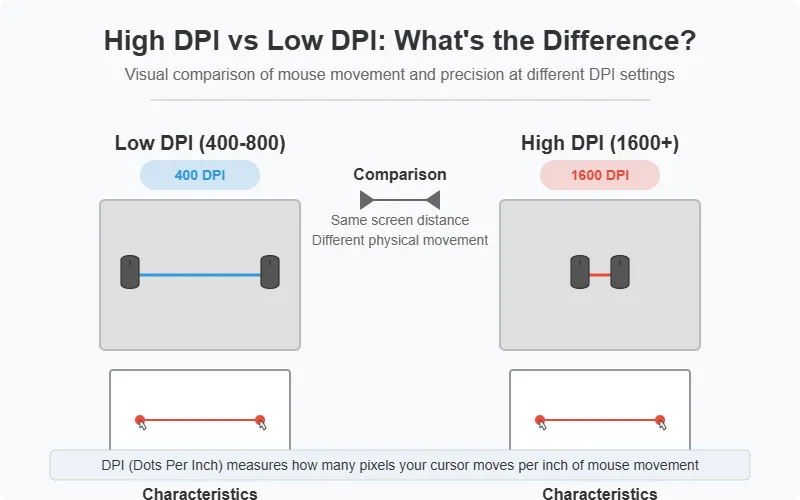
eDPI (effective dots per inch) measures your true in-game sensitivity by multiplying your mouse DPI by your in-game sensitivity value. It shows how much your crosshair moves per inch of mouse movement, giving a real benchmark of how fast or slow your setup actually feels.
Most gamers talk about “low sens” or “high sens,” but eDPI translates those vague ideas into exact numbers. It’s like a personal fingerprint for your aim style.
eDPI Meaning and Definition
The term eDPI simply means “effective DPI.” It’s not a setting on your mouse it’s a calculated result that combines two key variables:
- Mouse DPI (hardware resolution)
- In-game sensitivity (software multiplier)
This pairing lets you understand how precise your crosshair movement is in any FPS. High eDPI means your cursor travels more pixels per inch ideal for flick shots. Low eDPI offers fine-grained aim control for tracking precision.
eDPI vs DPI — The Difference Explained
DPI measures hardware sensitivity; eDPI measures real sensitivity in-game.
If two players both use a mouse set to 800 DPI but one sets in-game sensitivity to 1.0 and another to 0.5, their eDPI values are 800 and 400. Same mouse completely different feel.
This is why eDPI is the most consistent number for comparing aim styles. It neutralizes hardware differences and focuses purely on your actual on-screen movement.
🎯 Try our eDPI Calculator for FPS Games to quickly match your Valorant, CS2, or Fortnite sensitivity across platforms
eDPI Formula and Examples
Let’s go deeper with quick examples:
- Valorant: 800 DPI × 0.5 sens = 400 eDPI
- CS2: 400 DPI × 2.0 sens = 800 eDPI
- Fortnite: 1600 DPI × 0.7 sens = 1120 eDPI
How to Use the eDPI Calculator
Follow these quick steps to calculate eDPI online:
- Select your game: Choose Valorant, CS2, Apex, Overwatch 2, or Fortnite from the dropdown.
- Enter your mouse DPI: Use the exact DPI from your mouse software or hardware preset. If you’re unsure, verify it in the manufacturer’s app.
- Type your in-game sensitivity: Enter the value exactly as shown in the game (include decimals).
- Get your result: The calculator multiplies DPI × sensitivity and shows your eDPI instantly.
- Copy or tweak: Use the Copy button to save your eDPI, Reset to start over, or try Presets for common ranges per game.
How to Calculate eDPI Manually
It’s straightforward:
eDPI = Mouse DPI × In-Game Sensitivity
Example:
If you use DPI = 800 and sensitivity = 0.35,
then eDPI = 280.
That’s your true aim speed. You can easily compare this with pro players or tweak it to match your ideal range.
Game-Specific eDPI Calculators
Many players want to convert their sensitivity between games without losing muscle memory. Here’s how it works per title.
What Does eDPI Mean in Valorant, CS2, and Fortnite?
In games like Valorant, CS2, and Fortnite, eDPI decides how much hand movement you need for a 360° rotation. A consistent eDPI lets you switch between games without retraining your muscle memory.
Valorant eDPI Calculator
Valorant eDPI is based on slower, control-focused sensitivity. Use 200–400 for pixel-tight accuracy. A DPI-to-sensitivity converter helps you replicate your setup from other shooters like CS2 or Apex.
CS2 eDPI Calculator
CS2 (Counter-Strike 2) uses older sensitivity scaling, so eDPI values are usually higher. Typical pro range: 600–1000 eDPI. Use an online CS2 eDPI Converter to match your Valorant or Overwatch feel precisely.
Fortnite eDPI Calculator
Because of fast building and aiming mechanics, Fortnite players prefer 1000–1600 eDPI. It’s one of the few games where a high eDPI gives smoother 360° control for quick edits.
Pro Player Sensitivity & eDPI Settings
I often look at pro data to understand trends. Let’s break down what pros use across titles.
Valorant Pro Player eDPI (2025)
Most Valorant pros Tenz (320), Derke (280), Asuna (300) prefer slower control. They focus on precision tracking and aim discipline, not speed.
CS2 Pro Player eDPI (2025)
S1mple (880), NiKo (820), Zywoo (820), Donk (780) all within a tight range that balances flick and control. Consistency across years shows how eDPI correlates with sustained aim form.
Fortnite, Apex, and Overwatch Pro eDPI
- Fortnite: Bugha (1600), Mongraal (1440), Tfue (1200).
- Apex Legends: Aceu (1400), ImperialHal (1100), Faide (900).
- Overwatch 2: Sinatraa (640), Alfajer (600).
This shows each title favors different reaction styles Fortnite rewards speed, Valorant rewards precision.
Average Pro eDPI Across Games
Across all FPS titles, average pro eDPI sits near 800. That’s the sweet spot for balance between control and reaction.
If you’re unsure where to start, aim for this middle range and tweak slightly per your comfort.
Average, Best & Recommended eDPI Settings
Best eDPI for Valorant
For pinpoint headshot control, I’d recommend 300–400 eDPI. It slows your movement just enough to stabilize flick accuracy.
Best eDPI for CS2
A balanced zone between 700–900 eDPI keeps tracking fluid without over-shooting targets.
Best eDPI for Overwatch 2 and Apex Legends
Both games need faster turns. Stick to 900–1200 eDPI for steady flicks and wide sweeps.
Recommended eDPI for Warzone, Fortnite, and Marvel Rivals
Fast-paced shooters like Fortnite and Warzone usually run best between 1000–1600 eDPI for rapid 360° control.
eDPI Range for Wrist vs Arm Aiming
Wrist aimers work best between 600–1000 eDPI for tighter motion. Arm aimers usually thrive under 400 eDPI, where each movement is deliberate and large.
What Is Considered High or Low eDPI?
Low eDPI (under 400) feels slow but highly controlled best for head-tracking games like Valorant.
High eDPI (above 1000) feels fast ideal for action-heavy titles like Fortnite.
If your aim feels jumpy or sluggish, your eDPI might simply be mismatched to your reflex style.
eDPI Sensitivity Explained
Your eDPI value is the backbone of sensitivity scaling. It controls how your crosshair moves relative to real hand distance.
Once you know it, you can calculate cm/360 conversion how many centimeters it takes to make a full turn which is the gold standard for precision training in aim tools like AimLab or Kovaak’s.
eDPI Settings, Adjustment, and Scaling
I recommend adjusting eDPI in small steps (5–10%) instead of major jumps. Keep your resolution and mouse polling rate consistent during testing.
If your monitor or game has scaling options, note that it affects your aim’s physical feel. The same eDPI on 1080p and 1440p won’t track identically because of pixel density.
eDPI Comparison Table Across Popular FPS Titles
How to Read This Table
This table helps readers instantly compare average eDPI ranges across top FPS games and understand what pro players typically use. It reinforces expertise and provides data-driven context for different aiming styles and sensitivity needs.
eDPI Comparison Table
| Game Title | Typical eDPI Range | Average Pro eDPI | Aim Style | Notes / Playstyle Insight |
|---|---|---|---|---|
| Valorant | 200 – 400 | 320 | Low-speed precision | Emphasizes micro-control and headshot accuracy |
| CS2 (Counter-Strike 2) | 500 – 900 | 800 | Balanced tracking | Mix of flick and control, common among pro riflers |
| Overwatch 2 | 700 – 1100 | 900 | Fast hybrid | Wide-angle tracking with moderate precision |
| Apex Legends | 900 – 1300 | 1100 | Fast tracking | Larger mouse movements for dynamic combat |
| Fortnite | 1000 – 1600 | 1300 | High-speed agility | Quick camera turns for building and edits |
| Call of Duty / Warzone | 800 – 1400 | 1000 | Reaction-based | High responsiveness for target switching |
| Rainbow Six Siege | 400 – 800 | 600 | Controlled precision | Tight corners demand low-speed aim control |
| PUBG | 600 – 1000 | 800 | Medium tracking | Balance between recoil control and mobility |
| The Finals / Splitgate | 800 – 1200 | 950 | Medium-fast hybrid | Suits both close-quarters and long-range aim |
eDPI Calculation & Conversion Guides
How to Calculate eDPI in Any Game
Multiply your mouse DPI by your in-game sensitivity. Use it to maintain consistent aim across Valorant, CS2, or Apex.
If your 360° distance feels off after switching games, your eDPI changed not your skill.
eDPI to cm/360 Conversion
To calculate how far your hand moves for one rotation: cm/360 = (2.54 × 360) ÷ eDPI × sensitivity constant of each game. This tells you if your physical motion matches what pros use for training.
DPI to eDPI Converters & Cross-Game Matchers
Online converters make it easy to translate your setup between titles. For instance, CSGO to Valorant often uses a ×0.314 ratio to maintain feel. This ensures aim consistency and muscle memory stability.
eDPI vs DPI vs Sensitivity vs cm/360
Understanding the differences helps you tune aim correctly and answer common questions like edpi vs dpi, edpi vs sensitivity, and edpi vs cm/360 (also called inches per 360).
What changes what
- eDPI = DPI × sensitivity → your true aim speed. One number that reflects how fast your crosshair feels, regardless of hardware.
- DPI → the mouse sensor’s step size. Higher DPI captures finer movement; by itself it doesn’t say how fast the game turns.
- Sensitivity (in-game multiplier) → tells the game how much camera turn to apply per unit of mouse input.
- cm/360 (inches per 360) → physical distance you move the mouse to complete a full 360° turn. Lower cm/360 = faster turn; higher cm/360 = slower, more precise control.
How they work together
- Keep eDPI consistent to preserve your overall aim speed when you change mice or DPI presets.
- Use cm/360 to match feel across different games/engines; it’s the most reliable way to keep the same turn distance.
- To preserve the same eDPI, raise DPI and lower in-game sensitivity by the same factor (for example, 2× DPI → ½ sensitivity).
- Screen resolution and Windows pointer speed don’t change eDPI or cm/360 inside modern games that use raw input.
Your mouse DPI, display refresh rate, and polling rate form a triangle of responsiveness. Matching them creates aim stability; mismatching creates jitter or delay.
Comparative & Analytical Insights
DPI vs eDPI — Which Matters More?
eDPI matters more because it reflects both hardware and software input. DPI alone is just numbers.
What counts is how your aim feels in motion, and that’s what eDPI captures.
eDPI Trend Analysis (2023–2025)
Data shows a slow shift toward lower eDPI ranges among pros as monitors reach 240–360 Hz.
Lower sensitivity means steadier recoil control and smoother tracking due to reduced micro-corrections.
Highest & Lowest eDPI Among Esports Pros
The extremes:
- Highest: Bugha (1600) — pure speed.
- Lowest: Tenz (320) — surgical precision.
Different yet both world-class. The real lesson: find your personal stability point.
eDPI Benchmarking by Mouse Brand
Mouse sensor quality also affects aim stability.
- Razer & Logitech dominate competitive play due to low input latency and stable polling rates (1000 Hz).
- SteelSeries and Corsair offer similar sensor accuracy but with different feel curves.
Relationship Between eDPI and Polling Rate
A higher polling rate (1000 Hz) gives smoother tracking and reduces cursor delay, making eDPI adjustments feel more predictable. Always test both together sensitivity means nothing if input lag is inconsistent.
eDPI Impact on Aim Trainers
In apps like AimLab and Kovaak’s, always import your real eDPI to train accurately. Changing DPI mid-session skews results and resets progress.
eDPI Tools & Advanced Utilities
If you want to test your true settings, try eDPI analyzers and real-time checkers.
They measure input lag, polling rate, and precision tracking dynamically.
These tools go beyond static numbers to analyze real-world aim stability.
Suggested testing utilities:
- eDPI Finder / Tracker
- Mouse DPI Analyzer
- Input Lag Tester
- Cross-Game Sensitivity Comparison Tool
Keep the Same Sens Across Games
Different engines process mouse input with their own yaw (turn-per-count) values and camera FOV, so the same DPI × sensitivity can feel faster in one title and slower in another. If your goal is to match sensitivity across games, anchor on cm/360 (inches per 360°) the physical distance you move to complete a full turn. That metric preserves muscle memory regardless of engine math.
Matching only by eDPI can miss engine math yaw coefficients and FOV can shift how the same setting feels. Use eDPI to sanity-check speed, but finalize by matching cm/360.
How eDPI Affects FPS Tracking and Consistency
eDPI influences how smooth your target acquisition feels. Too high you’ll overshoot. Too low you’ll lag behind.
The right value builds consistent crosshair motion tied directly to your hand’s natural movement speed.
Quick method
- In your current game, note DPI and sensitivity, then record your cm/360.
- In the target game, adjust sensitivity until the cm/360 matches.
- Keep DPI constant across titles; if you change DPI, adjust in-game sensitivity inversely to keep the same turn distance.
Example: Moving Valorant to CS2 sens start with an eDPI match, then fine-tune sensitivity until your cm/360 in CS2 equals your Valorant baseline.
Need a fast way to line things up? Use the Sensitivity Converter to copy your settings across titles while targeting the same cm/360.
Troubleshooting Sens Feel
If your aim suddenly feels too fast or too slow after a new mouse, switching games, or changing DPI, work through these quick checks to fix sensitivity issues:
- Verify DPI in software
Inspect the DPI setting in your mouse’s setup tool (Logitech, Razer, Corsair, etc.) to confirm the profile. Disable on-the-fly stages you don’t use. - Turn off Windows acceleration
In Mouse → Pointer Options, disable Enhance Pointer Precision. In supported games, enable Raw Input so OS settings don’t interfere. - Stabilize polling rate
Switch your report rate to 500–1000 Hz, then verify stability with a mouse polling checker. An unstable Hz can make micro-aim feel inconsistent. - Keep eDPI constant
If you change DPI, adjust in-game sensitivity inversely so DPI × sensitivity stays the same. That preserves your aim speed. - Match by cm/360 across games
Different engines (yaw, FOV) can change perceived speed. Use the same cm/360 to keep muscle memory intact when you switch titles.
Miscellaneous / Global Tools
Global players search for eDPI info in their languages:
- Japanese: edpi 計算, edpi 計算方法
- Korean: 발로란트 edpi 계산기
- Turkish: edpi nedir
- Portuguese: o que é edpi
- Spanish: que es el edpi
- Russian: как посчитать edpi
- Polish: co to jest edpi
- Vietnamese: edpi nghĩa là gì
FAQs
What is a good eDPI for Valorant, CS2, and Apex?
For tactical shooters like Valorant and CS2, most pros use 250–400 eDPI, while Apex Legends players prefer 300–500 eDPI for smoother tracking. These values balance control and speed. Always fine-tune using your cm/360 distance and available mousepad space.
How is eDPI calculated in FPS games?
eDPI is calculated by multiplying your mouse DPI by your in-game sensitivity. It’s the best way to measure true aim speed across games like Valorant, CS2, and Apex. This lets you match pro settings or compare your aim consistency across multiple titles.
How do I convert CS2 eDPI to Valorant?
To convert CS2 eDPI to Valorant, divide your CS2 eDPI by 3.18. For example, if your CS2 eDPI is 960, your Valorant equivalent is roughly 302. This conversion maintains identical aim feel, helping you switch between both games smoothly.
Does resolution affect eDPI?
No resolution doesn’t change eDPI, because it depends only on your DPI and sensitivity settings. However, different resolutions or FOVs can feel faster or slower due to visual scaling, even though your actual eDPI number remains identical.
Should I use 400 or 800 DPI?
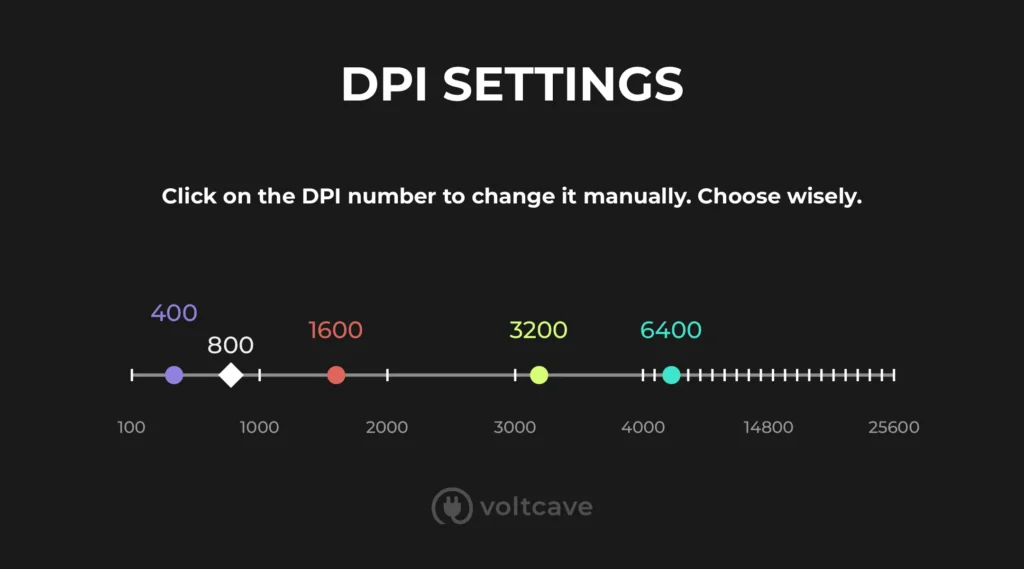
Both options are valid. Use what feels smooth on your pad. If you increase DPI from 400 to 800, halve your in-game sensitivity to keep the same eDPI. The goal is consistent aim speed, not just a higher DPI number.
What’s better for matching: eDPI or cm/360?
Use cm/360 to match sensitivity across different games or engines, since it accounts for yaw and FOV changes. eDPI is best for comparing setups within the same game. For accurate cross-game consistency, cm/360 is more reliable.
How can I match eDPI across CS2, Valorant, and Fortnite?
Use an eDPI cross-game calculator. Enter your DPI and sensitivity for one game, and the tool converts it for others like Valorant, CS2, or Fortnite. This keeps your aim movement identical across all FPS games you play.
Which eDPI should I use for Logitech or Razer mice?
Both Logitech and Razer sensors perform best between 400–800 DPI with in-game sensitivities that produce 900–1000 eDPI. This range offers smooth control and high tracking precision without pixel skipping or jitter.
Final Thoughts
eDPI isn’t just a number it’s the true measurement of your control over precision. Once you know it, you can switch between any FPS, test pro setups, and fine-tune your aim scientifically rather than guessing. Your sensitivity becomes data, not myth.
Tips
- Enter the precise decimal sensitivity to avoid rounding errors.
- Check the active DPI profile in your mouse software before calculating.
- Windows pointer speed and screen resolution don’t change eDPI; it’s strictly DPI × in-game sensitivity.

PollingRateTester.com provides browser-based testing tools for measuring mouse DPI, polling rate, latency, and other device performance metrics. All tools are tested on real hardware, including USB and Bluetooth mice and high-refresh-rate monitors, to ensure accurate and repeatable results.
The website is maintained by a technical team that regularly updates tools and guides in response to browser, sensor, or firmware changes to keep measurements consistent, precise, and transparent.