
Introduction
Let’s be real, the best mechanical gaming keyboard market in 2026 looks nothing like it did two years ago. Hall Effect switches and Rapid Trigger technology have gone fully mainstream, brands are launching competitive-grade boards at under $70, and the excuse to overpay for a name-brand logo has officially expired. Yet somehow, gamers are still dropping $200 on keyboards that don’t perform any better than what’s on this list.
Here’s the truth most gear reviewers won’t say out loud: the price tag has almost nothing to do with how well you perform. The real innovation, adjustable actuation points, Hall Effect magnetic switches, hot-swap sockets, and wireless connectivity, has trickled down to the sub-$100 range faster than anyone expected. As of February 2026, you can get features that were flagship-exclusive in 2024 for well under a hundred bucks.
The challenge isn’t finding a good keyboard at this price anymore. It’s cutting through the noise, the spec-sheet wars, the influencer deals, the artificially inflated “regular prices” to find the boards that are actually worth buying right now.
This guide does exactly that. Ten mechanical gaming keyboards under $100, researched using verified buyer reviews, real-world performance data, and the latest February 2026 market information, ranked, compared, and explained so you can stop second-guessing and start gaming.
| 🔧 Try it free → Keyboard Polling Rate Test. Already have a keyboard? Verify its actual polling rate for free, no downloads needed. |
Why Your Keyboard Choice Actually Matters More Than Your Mouse in 2026
Most gamers obsess over their mouse DPI, polling rate, sensor tracking, but here’s what gets overlooked: your keyboard is responsible for every movement command, every ability activation, every split-second decision that wins or loses a round. A sluggish, inconsistent keyboard is a hidden handicap you didn’t know you had.
Mechanical keyboards stand apart because of how their switches work. Unlike membrane keyboards that require you to fully bottom out a key before it registers, mechanical switches actuate at a specific point mid-travel, typically between 1.5mm and 2mm. That’s faster, more accurate, and in competitive gaming, that’s the difference between a registered block and a missed parry.
But in 2026, the game has changed even further. Hall Effect switches, which use magnetic sensors instead of a physical contact point,s are now mainstream technology at the sub-$100 price point. These switches allow adjustable actuation from 0.1mm to 4.0mm and support Rapid Trigger, a feature that lets a key re-register the instant you begin releasing it rather than waiting for a full reset. For FPS players doing counter-strafes in CS2 or Valorant, that’s a measurable competitive edge, and it’s available on three keyboards on this list for under $90.
The great news? The traditional mechanical vs Hall Effect debate no longer requires choosing between budget and performance. Today’s sub-$100 mechanical gaming keyboards deliver both proven Cherry MX reliability and cutting-edge Hall Effect precision. Before upgrading, run our free Keyboard Polling Rate Test to check whether your current board is even delivering the response rate it promises. You might be surprised what you’re leaving on the table.
| 🔧 Try it free → Keyboard Test: Test every key on your current keyboard for dead keys, stuck keys, or missed inputs free, instant, browser-based. |
What to Look for Before You Buy a Mechanical Gaming Keyboard
Switch Type: The Most Important Decision You’ll Make in 2026
Switches are the heart of any mechanical gaming keyboard, and in 2026, you have more options than ever before. The traditional three-category model (linear, tactile, clicky) is now joined by Hall Effect magnetic switches, which are rapidly becoming the competitive standard. Here is what each type delivers:
Linear switches (like Cherry MX Red, Gateron Yellow, or Kailh Speed Silver) offer a smooth, straight keystroke with no bump or click, ideal for fast FPS gaming where rapid repeated inputs matter most. Actuation sits around 1.5–2mm, making them the quickest to activate. Tactile switches (like Cherry MX Brown or HyperX Aqua) provide a subtle bump at the actuation point without a click the best all-rounder for gamers who also type heavily. Clicky switches (like Cherry MX Blue or Outemu Blue) add an audible click deeply satisfying, but loud, audible click, and the click mechanism can slightly slow down rapid repeat presses.
Hall Effect switches (found on the Keychron K2 HE, SteelSeries Apex Pro TKL, and Gamakay NS68 on this list) operate on magnetic sensors with zero physical wear. You can adjust their actuation point anywhere from 0.1mm to 4.0mm in software, and Rapid Trigger allows instant re-registration, a feature that traditional mechanical switches fundamentally cannot replicate. Hall Effect switches are also rated for 100–150 million actuations versus 50–100 million for conventional mechanical switches. For competitive gaming in 2026, Hall Effect is increasingly the standard of choice.
Form Factor: TKL vs Compact vs Full-Size
Your keyboard’s size directly affects your gaming posture and mouse movement. A TKL gaming keyboard removes the numpad, giving your mouse arm more room to breathe critical for low-sensitivity FPS players. A compact mechanical keyboard (65% or 75% layout) goes even further, cutting navigation clusters to maximize desk space. For most competitive gamers, TKL or compact is the smarter call. If you’re not sure about your current sensitivity setup, our eDPI Calculator can help you figure out whether a TKL upgrade actually makes sense for how you play.
Wired vs Wireless
Wired keyboards offer near-zero input lag, no battery concerns, and play. Wireless mechanical gaming keyboards have improved dramatically, and today’s best models using Bluetooth 5.1 or 2.4GHz dongles are practically indistinguishable from wired in casual and semi-competitive play. To understand how polling rate affects keyboard response at a hardware level, our Keyboard Polling Rate Test gives you a real-time reading of exactly how fast your board communicates with your PC.
Build Quality and Materials
An aluminum top plate versus a full-plastic chassis is night and day in terms of rigidity, sound dampening, and overall feel. At the sub-$100 price point, look for boards with at least an aluminum or alloy top plate. Full aluminum construction (like the HyperX Alloy Origins Core) at this price range is exceptional value and a strong indicator of long-term durability.
RGB and Software
Per-key RGB lighting is a nice touch, but don’t let it drive your decision. What matters more is whether the software ecosystem is reliable. Bloated, crash-prone software makes even a great keyboard frustrating to own long-term. Look for boards with solid companion apps or, better still, open-source QMK/VIA support. It’s the gold standard for customization without the headaches.
Price-to-Performance Ratio
The under-$100 bracket has some genuinely outstanding value plays right now. Three of our top ten picks offer hot-swap sockets, wireless connectivity, and premium switches at or below the $90 mark. After you lock in your keyboard, don’t forget to pair it with the right mouse settings. Use our Mouse Sensitivity Converter to sync your setup across games without losing your feel.
The 10 Best Mechanical Gaming Keyboards Under $100
Each keyboard below was evaluated based on verified user feedback from Amazon and Reddit communities, expert hands-on testing data, brand specifications, switch performance benchmarks, build materials, and real-world gaming use cases. No sponsored picks. No filler. Just the best ten options at this price point.
#1 Keychron K8 Pro — Best Overall TKL Mechanical Gaming Keyboard
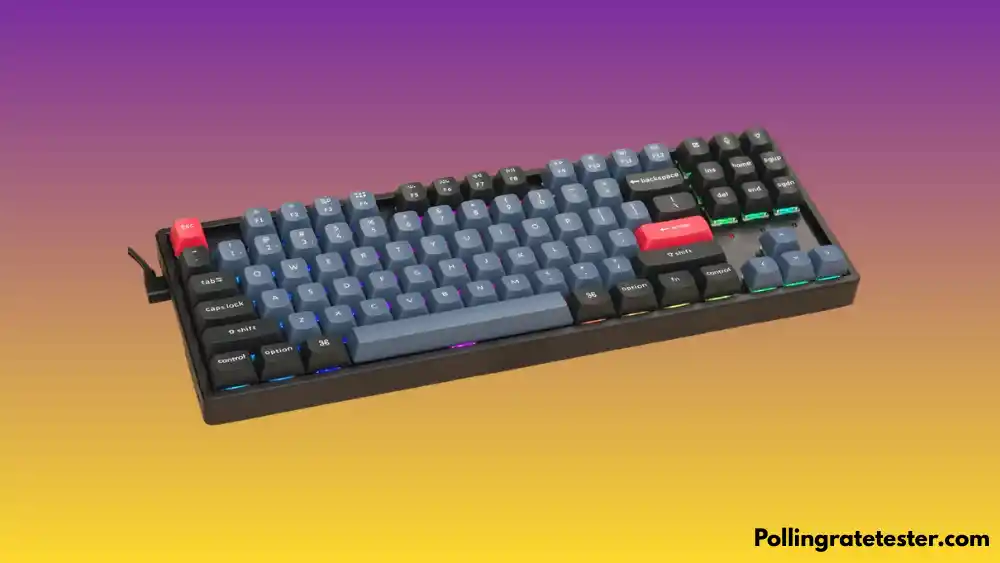
The Keychron K8 Pro is the benchmark for what a sub-$100 TKL gaming keyboard should look like in 2025. It delivers wireless freedom via Bluetooth 5.1, hot-swappable sockets so you can swap switches without soldering, and full QMK/VIA support for deep programmability, a combination that’s practically unheard of at this price.
The board connects to up to three devices simultaneously and switches between them instantly, which is ideal for gamers who bounce between a PC and a laptop. Battery life with the 4,000mAh cell runs up to 300 hours with RGB off, meaning you might charge it once a month under typical use. The aluminum frame option adds meaningful rigidity without pushing the price past $100.
One honest note: the Bluetooth range draws some criticism from users, and the stock keycaps are ABS plastic rather than the more durable PBT. The tray-mount design, while functional, isn’t as acoustically satisfying as a gasket mount. But for the package on offer, wireless, hot-swap, QMK, TKL, nothing else at this price comes close.
✅ Pros
- ✅ Hot-swappable sockets change switches without any tools or soldering
- ✅ Bluetooth 5.1 with tri-device pairing and near-instant switching
- ✅ Full QMK/VIA support for the most powerful open-source remapping available
- ✅ 4,000mAh battery with up to 300 hours of use with RGB off
- ✅ Works on both Mac and Windows with included alternate keycaps
❌ Cons
- ❌ Bluetooth range can be inconsistent beyond 3 meters per multiple user reports
- ❌ Stock ABS keycaps feel thin; a PBT upgrade is worth budgeting for
- ❌ Tray-mount design creates slightly uneven sound across the board
- ❌ USB-C port sits on the left side, which some desk setups find awkward
#2 HyperX Alloy Origins Core — Best Build Quality TKL Under $100
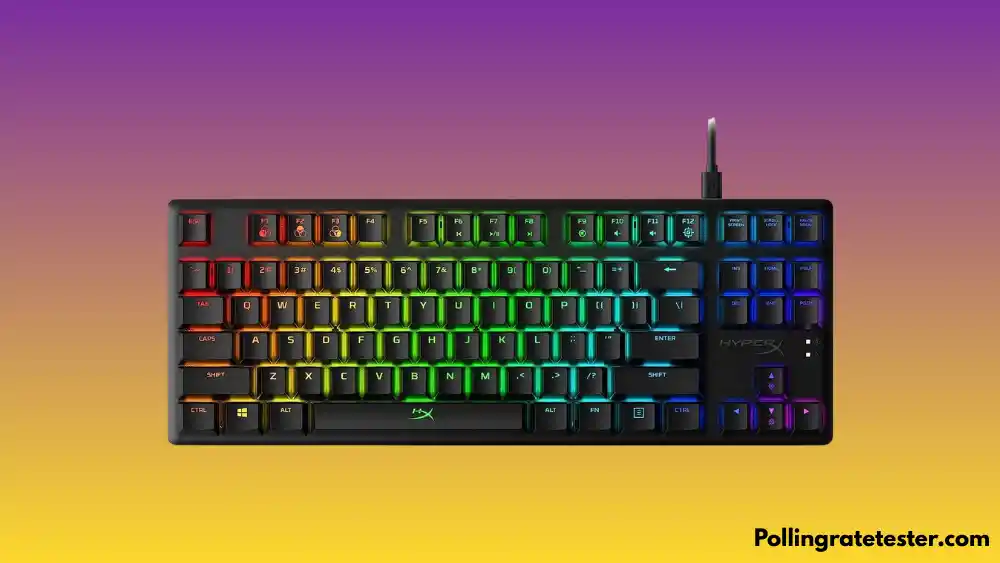
If you want a keyboard that feels like it costs $180, but actually costs $69, this is it. The HyperX Alloy Origins Core is built from aircraft-grade aluminum top plate AND bottom casing, which is legitimately exceptional at this price point. Most boards in this range use a plastic bottom. Not this one.
HyperX uses its own in-house switches (Red for linear, Aqua for tactile, Blue for clicky), which perform on par with Cherry MX equivalents in real-world gaming. The HyperX Aqua switch has won converts from both Cherry MX Brown and Red camps. It offers a light, clean tactile bump that doesn’t interrupt rapid key repeats. Per-key RGB is bright and vivid, and the aluminum body enhances sound dampening compared to plastic-chassis rivals.
The trade-offs are real: no wireless, no hot-swap, and the NGENUITY software (a Windows Store app) has had a rocky history, with some users reporting connectivity issues. The braided USB-C cable is rigid and prone to kinking over time. But as a pure wired gaming TKL with elite build quality, the Origins Core punches far above its price tag.
✅ Pros
- ✅ Full aircraft-grade aluminum construction, top and bottom, for exceptional value
- ✅ Three switch options: linear Red, tactile Aqua, clicky Blue
- ✅ Bright, per-key RGB with three onboard profile slots
- ✅ Three typing angle adjustments for ergonomic customization
- ✅ N-key rollover and anti-ghosting for clean, competitive input
❌ Cons
- ❌ No wireless option, wired only
- ❌ Switches are not hot-swappable
- ❌ NGENUITY software is a Windows Store app with reported connectivity bugs
- ❌ Braided USB-C cable is stiff and develops kinks over time
- ❌ No dedicated media keys or volume wheel
#3 Corsair K70 CORE — Best Full-Size Mechanical Gaming Keyboard Under $100
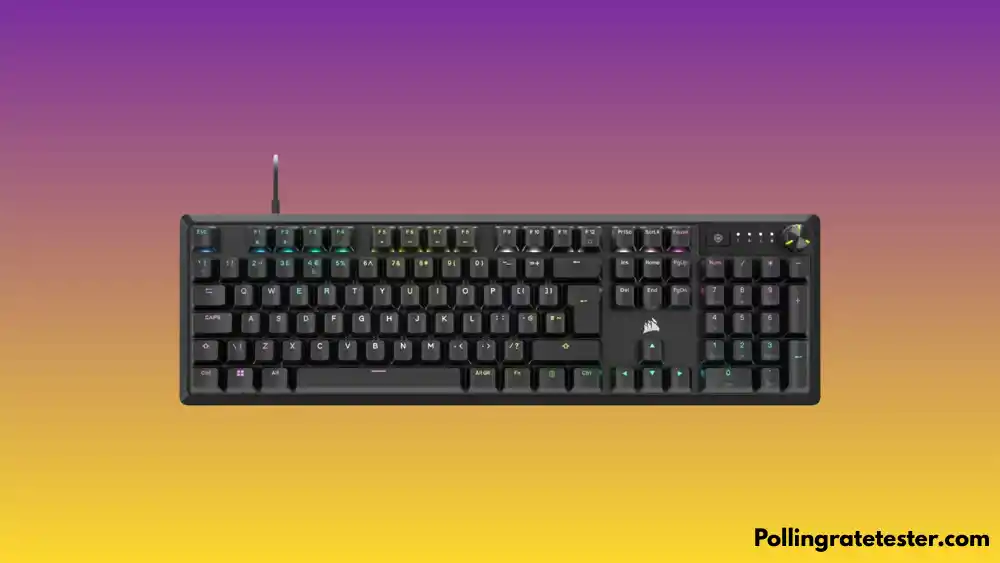
Corsair’s K70 lineup has been a staple of gaming setups for over a decade, and the K70 CORE brings the name down to a genuinely accessible price without gutting what made it worth buying in the first place. It’s a full-size board with a noticeably slimmer footprint than older K70 models. Corsair trimmed the bezel significantly to make it feel less bulky on the desk.
The standout feature is the configurable multi-function dial in the top-right corner borrowed straight from Corsair’s $200+ K100 RGB flagship. By default, it controls volume, but via iCUE, you can map it to zoom, scroll, or backlight brightness. It’s a genuinely useful addition at this price. The Corsair MLX Red linear switches deliver consistent, smooth actuation, well-suited for fast-paced gaming, and feature vivid per-key RGB lighting.
The honest drawbacks: the USB cable is not detachable, a notable miss for a modern gaming keyboard. The bundled wrist rest feels underwhelming for the price. And some reviewers find iCUE clunky and over-engineered. If you need the numpad and want the K70 brand experience without the flagship price, this is the pick.
✅ Pros
- ✅ Multi-function configurable dial is a premium feature at this price point
- ✅ Aluminum top plate with a slimmer, cleaner design than older K70 boards
- ✅ Per-key RGB with vivid Corsair lighting quality
- ✅ MLX Red linear switches are smooth and gaming-optimized
- ✅ Full-size layout retains the numpad for users who need it
❌ Cons
- ❌ Non-detachable USB cable is a frustrating design choice
- ❌ iCUE software can be clunky and occasionally buggy
- ❌ Wrist rest quality feels underwhelming relative to the price
- ❌ Full-size layout takes up significant desk space, not ideal for low-sensitivity FPS
#4 Royal Kludge R65 — Best Budget Compact Gaming Keyboard
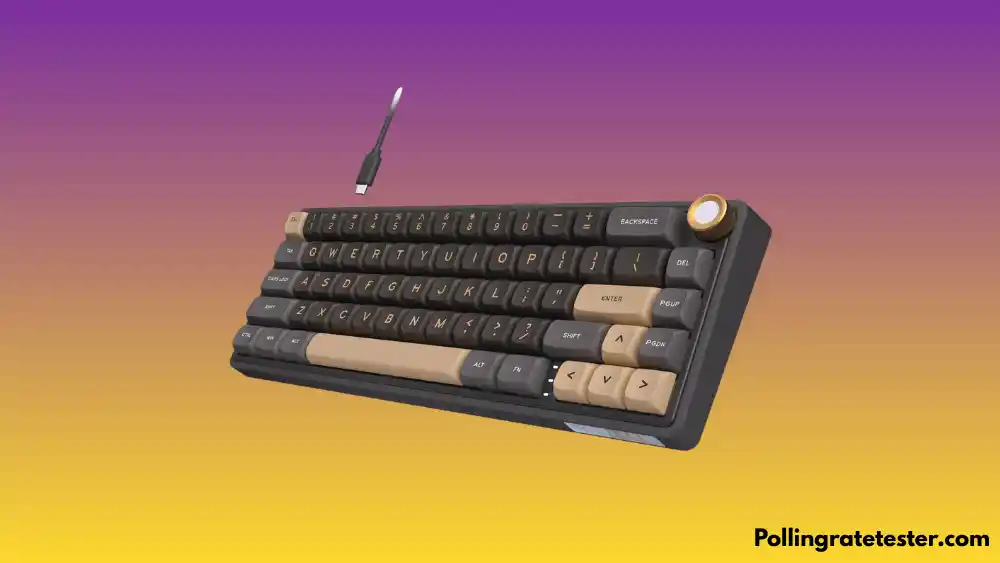
The Royal Kludge R65 is the kind of keyboard that makes you do a double-take at the spec sheet. For around $55, you get a 65% compact gaming keyboard with triple-mode connectivity (wired USB-C, 2.4GHz wireless dongle, and Bluetooth), hot-swap sockets, a gasket-mounted build for better acoustics, and per-key RGB. At this price, that’s borderline absurd value.
The 65% layout is the sweet spot between a full-size board and a minimalist 60% you keep the arrow keys and some navigation keys while gaining serious desk real estate. The gasket mount gives keystrokes a softer, more cushioned feel compared to the stiffer tray-mount found on competitors. The 2.4GHz wireless connection is responsive enough for competitive gaming without the cable.
Where the R65 makes concessions is in the build material; the frame is primarily plastic, and the keycaps are ABS. Software customization is limited. But for the gamer who wants wireless freedom, hot-swap flexibility, and a compact footprint without breaking $60, nothing on this list beats the R65. Pair it with our free Mouse Sensitivity Converter to dial in the extra desk space this 65% layout gives your mouse arm.
✅ Pros
- ✅ Triple connectivity USB-C wired, 2.4GHz wireless dongle, and Bluetooth
- ✅ Hot-swappable sockets at this price are genuinely exceptional value
- ✅ Gasket mount provides a softer, more premium typing feel
- ✅ 65% layout keeps arrow keys while dramatically reducing desk footprint
- ✅ Best price-to-feature ratio on this list under $60
❌ Cons
- ❌ Plastic frame has a less premium feel compared to aluminum competitors
- ❌ ABS keycaps will develop shine over time with heavy daily use
- ❌ Software customization is limited compared to premium brand software
- ❌ 65% layout removes the dedicated function row Fn layer required for F1–F12
#5 Ducky Zero 6108 — Best Cherry MX Mechanical Keyboard Under $100
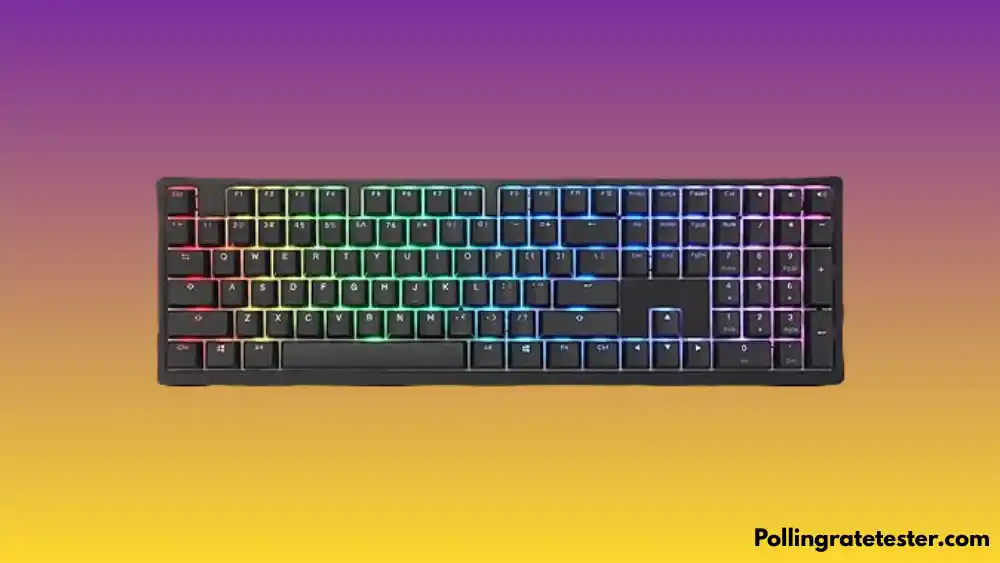
If genuine Cherry MX switches are non-negotiable for you and for many enthusiasts, the Ducky Zero 6108 is where you go at the under-$100 mark. Ducky has earned its reputation as one of the most respected keyboard manufacturers in the enthusiast community, and the Zero 6108 brings that pedigree to a mainstream price point.
The board uses Cherry MX2A switches, the latest generation of Cherry’s legendary lineup, updated with refined spring and stem tolerances for a smoother, more consistent feel than older Cherry MX variants. Double-shot PBT keycaps come standard, which means legends won’t fade and the surface won’t develop a shine even after years of heavy use. Pre-applied lube on the stabilizers reduces rattle straight out of the box, a touch you usually only find on more expensive boards.
It’s wired-only with no hot-swap support. For enthusiasts who know they want Cherry MX and don’t plan to experiment with switch types, that’s not a dealbreaker. The Ducky Zero 6108 is for the purist who wants proven, industry-standard switches with build quality to match.
✅ Pros
- ✅ Genuine Cherry MX2A switchesare the latest and most refined Cherry generation
- ✅ Double-shot PBT keycaps are standard, fade-resistant, and durable
- ✅ Pre-lubed stabilizers reduce rattle straight out of the box
- ✅ Ducky brand qualityis among the most respected names in enthusiast circles
- ✅ Full-size layout with numpad, function row, and navigation cluster intact
❌ Cons
- ❌ Wired only, no wireless option
- ❌ No hot-swap support is committed to your chosen switch type at purchase
- ❌ Sits at the very top of this guide’s price range at ~$99
- ❌ Full-size form factor is large for competitive gaming setups
Redragon K552 Kumara — Best Entry-Level TKL Mechanical Gaming Keyboard
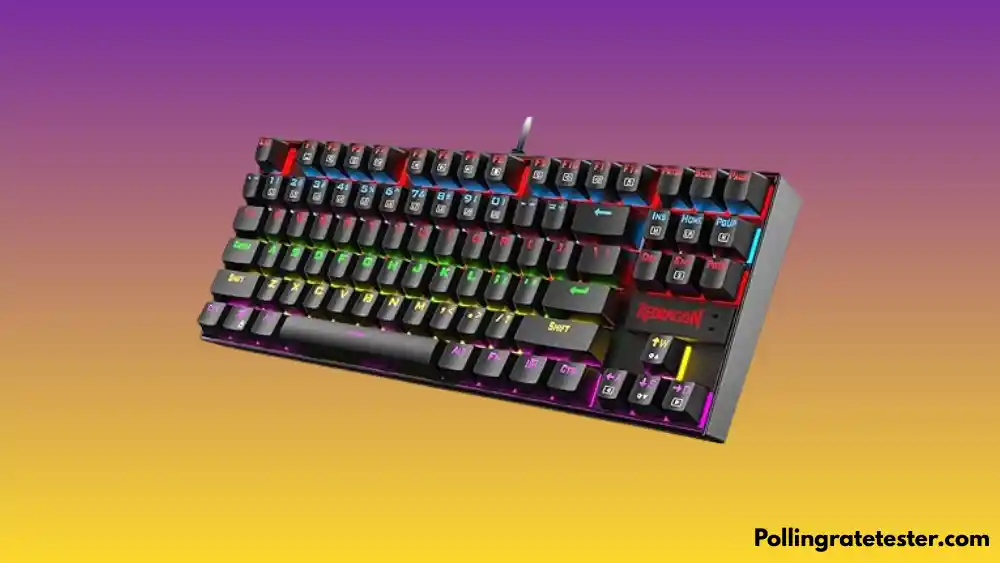
The Redragon K552 Kumara is the gateway drug of mechanical keyboards, and it has converted more membrane keyboard users than almost any other board in this price range. At roughly $35, you get genuine mechanical switch feedback, a TKL layout, N-key rollover for anti-ghosting, and a metal-reinforced chassis that defies the price.
The Outemu Blue switches are Cherry MX Blue clones; they deliver the tactile bump and audible click that defines the classic mechanical keyboard experience. Actuation force sits around 46g, slightly lighter than genuine Cherry Blues, making them quick to activate for gaming. After testing this keyboard, run our Keyboard Test to verify every key registers cleanly before your first session.
The honest reality: the K552 is a starting point, not an endgame. Some units show inconsistent long-term reliability, with occasional RGB failures or key registration issues reported after extended heavy use. Software customization is non-existent everything is done via keyboard shortcuts. It’s not the keyboard you use for the next five years, but it’s the keyboard that proves why mechanical switches are worth the switch.
✅ Pros
- ✅ Genuine mechanical switches at the lowest price point on this list
- ✅ N-key rollover and anti-ghosting for clean, competitive input registration
- ✅ Metal-reinforced chassis provides more rigidity than typical budget boards
- ✅ Splash-resistant design adds basic durability for everyday desk use
- ✅ TKL layout gives more mouse room at a price that removes every excuse
❌ Cons
- ❌ Some units report reliability issues after 4–6 months of heavy use
- ❌ Zero software support, all customization requires manual keyboard shortcuts
- ❌ Outemu switches have a lower rated lifespan than genuine Cherry MX
- ❌ ABS keycaps will shine quickly under heavy daily typing
- ❌ Below-average input latency compared to premium options on this list
Keychron K2 HE — Best Wireless Compact Mechanical Gaming Keyboard
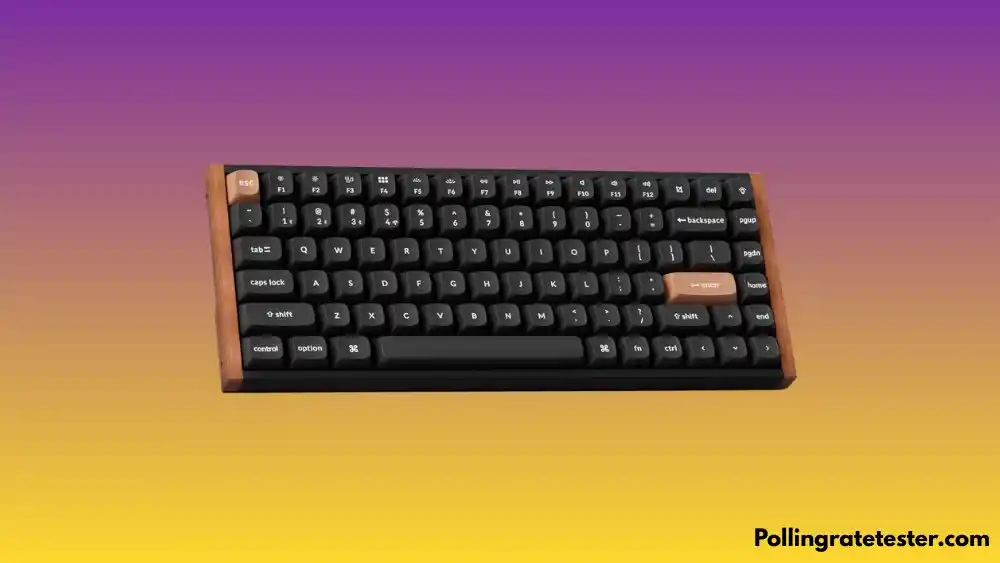
Hall Effect technology in a wireless compact gaming keyboard under $100 sounds like it shouldn’t exist. The Keychron K2 HE makes it real. Hall Effect switches use magnetic sensors instead of physical contact points, meaning there’s no mechanical wear on the actuation mechanism, and you can adjust actuation distance anywhere from 0.1mm to 4.0mm via software. That’s the same technology powering keyboards twice the price.
The 75% form factor keeps all the gaming-critical keys, function row, arrow keys, and a slim navigation column while shedding the numpad. Rapid trigger support means the keyboard re-registers a new press immediately after a key begins releasing, rather than waiting for a full reset past the actuation point. For FPS counter-strafing, this is a genuine competitive edge. Once your keyboard is set up, use our Reaction Time Test to measure whether your inputs are translating into faster real-world reflexes.
QMK/VIA support makes remapping and macro creation accessible at any skill level. The K2 HE’s technology stack, Hall Effect, wireless, hot-swap, rapid trigger, QMK, is the most forward-thinking on this list. This is the compact gaming keyboard for the gamer who plays to win.
✅ Pros
- ✅ Hall Effect switches with adjustable actuation (0.1–4.0mm), elite competitive technology
- ✅ Rapid trigger support for faster counter-strafing and movement inputs
- ✅ Wireless Bluetooth 5.1 with tri-device pairing
- ✅ Full QMK/VIA support for deep, open-source customization
- ✅ 75% layout keeps arrow keys and function row in a compact footprint
❌ Cons
- ❌ Hall Effect is newer tech, fewer community mods and resources vs Cherry MX
- ❌ Stock keycaps are ABS. A PBT swap is recommended for enthusiasts
- ❌ 75% layout removes some navigation keys that some users depend on
- ❌ 1,000Hz polling rate, ultra-competitive players may want 8,000Hz options
#8 EVGA Z15 — Best Hot-Swappable Mechanical Keyboard Under $50
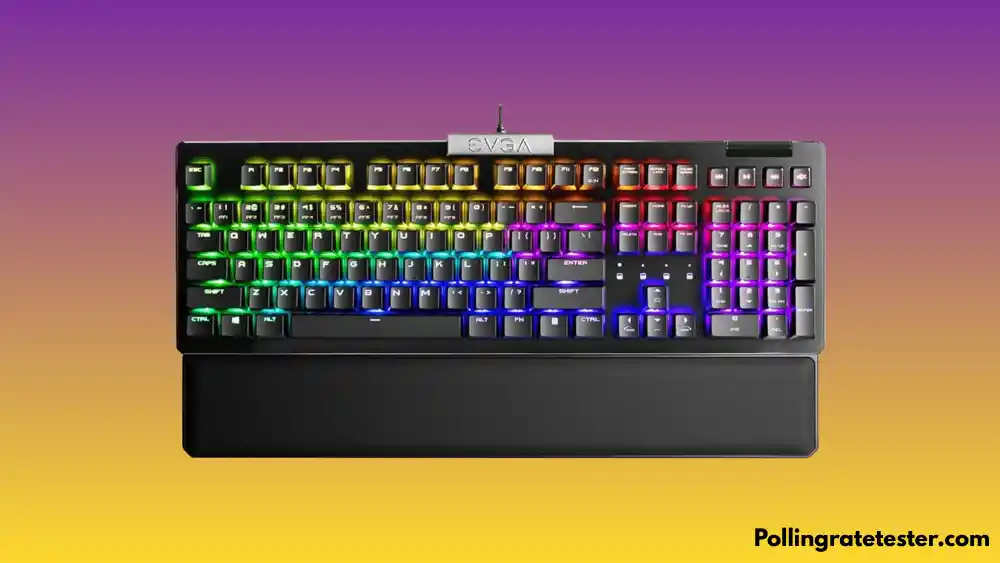
The EVGA Z15 occupies a unique position on this list: it’s the only keyboard here that delivers hot-swappable sockets under $50. That matters because hot-swap transforms a keyboard from a fixed purchase into an evolving platform swap in Gateron Yellows for silky linear action, pop in Cherry MX Browns for tactile feedback, or experiment with any 3-pin MX-compatible switch at zero cost beyond the switches themselves.
The Z15 features a TKL layout, per-key RGB, and linear Kailh Speed Silver switches designed specifically for gaming response. The build uses an aluminum top plate for rigidity, and the keyboard includes a magnetic detachable wrist rest that actually adds meaningful support, unlike the flimsy offerings found on most budget boards.
EVGA exited the GPU market in 2022, but its peripherals division continued, and the Z15 remains one of the best-supported hot-swap keyboards at this price. The software is clean and doesn’t require a Windows Store account. After setting up, run a quick Keyboard Polling Rate Test to confirm your new switches are delivering the response rate you expect.
✅ Pros
- ✅ Hot-swappable switches under $50 the best value hot-swap on this list
- ✅ Magnetic detachable wrist rest included and genuinely useful
- ✅ Aluminum top plate adds rigidity without inflating the price
- ✅ Kailh Speed Silver switches are purpose-built for gaming response times
- ✅ Clean RGB software that doesn’t require a store account
❌ Cons
- ❌ Wired only, no wireless capability
- ❌ Kailh Speed Silver may feel too light for users coming from tactile switches
- ❌ EVGA’s peripheral lineup may see reduced innovation going forward
- ❌ ABS keycaps’ durability is a concern for heavy daily users
#9 SteelSeries Apex Pro TKL — Best Adjustable Switch TKL Gaming Keyboard
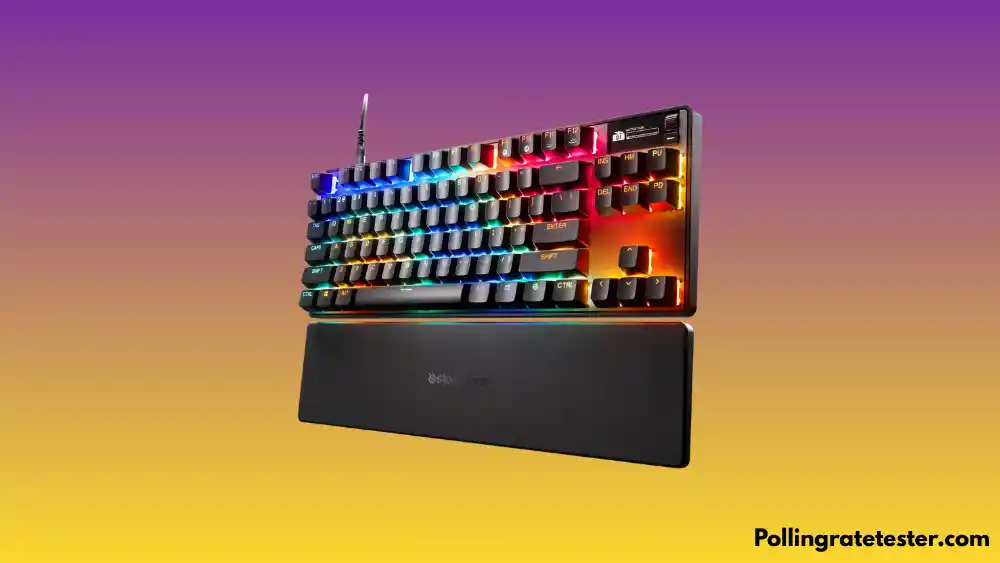
The SteelSeries Apex Pro TKL sits at the very top of this guide’s price ceiling, and it earns every penny of it. The OmniPoint Hall Effect switches offer per-key actuation adjustment from 0.1mm to 4.0mm, meaning you can set WASD keys to trigger at a hair-touch 0.2mm for lightning-fast movement inputs, while keeping your space bar at a conservative 2.5mm to prevent accidental activations. No other keyboard on this list gives you this level of precision.
The Apex Pro TKL also supports Rapid Trigger, the switch re-arms the moment you begin lifting a key rather than waiting for full release, which delivers meaningfully faster counter-strafe inputs in FPS games. An OLED smart display shows game stats and settings above the function row. Want to know if your reflexes are actually improving?
Reddit’s competitive gaming community rates this board highly for FPS titles. The main criticism is that SteelSeries’ GG software, some users find it bloated and occasionally unreliable, with keyboard settings failing to load on specific USB ports. If you can navigate the software quirks, the hardware is exceptional. At $99, this is the most technically capable keyboard on this entire list.
✅ Pros
- ✅ Per-key adjustable actuation from 0.1mm to 4.0mm, elite competitive precision
- ✅ Rapid Trigger for the fastest possible movement input registration
- ✅ OLED smart display adds game-relevant information without gimmick
- ✅ Magnetic wrist rest included with solid tournament-grade aluminum build
- ✅ OmniPoint Hall Effect switches offer near-infinite switch tuning flexibility
❌ Cons
- ❌ GG software is bloated and has documented reliability issues on some setups
- ❌ Wired-only wireless version costs significantly more
- ❌ ABS/PBT keycap mix varies by region. Verify your listing before purchase
- ❌ At $99, it’s the most expensive pick on this list. Budget buyers should look elsewhere
#10 Gamakay x NaughShark NS68 — Best Budget Hall Effect Gaming Keyboard
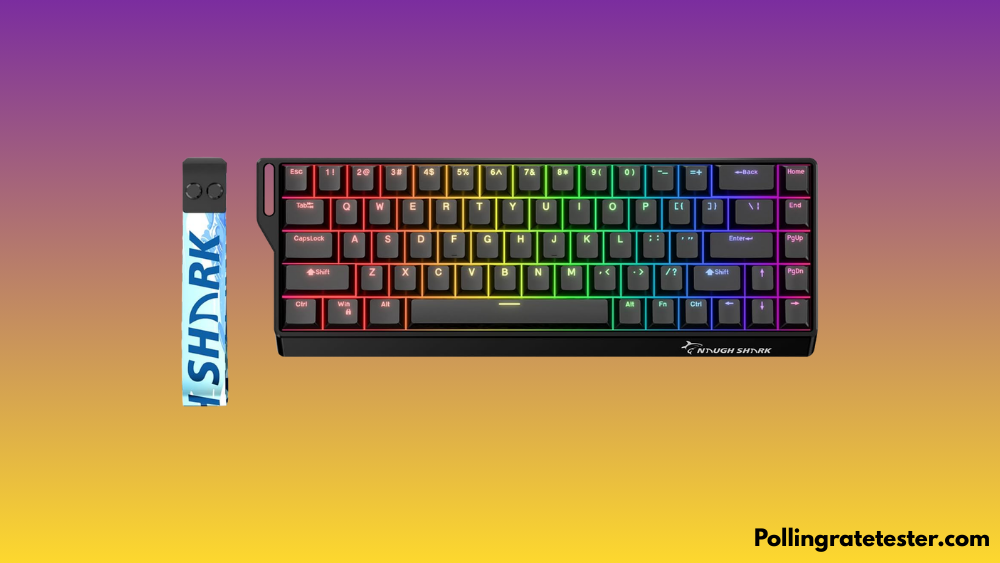
PC Gamer named the Gamakay x NaughShark NS68 its best budget gaming keyboard, a recognition that still stands in early 2026. This 65% compact gaming keyboard brings Hall Effect switches and 8,000Hz polling to under $90, making it one of the most accessible entry points into rapid trigger gameplay on the entire list. CES 2026 confirmed that Gamakay’s Hall Effect lineup aligns with the direction the entire competitive keyboard market is moving, and the NS68 remains the value benchmark.
The NS68 features a gasket-mounted build for a softer, more cushioned typing feel, hot-swappable sockets so you can swap switches anytime, double-shot PBT keycaps that resist fade and shine, and per-key RGB. That combination at $65 is genuinely hard to argue with. Rapid trigger support means the keyboard is built for competitive gaming, not just marketed for it.
The 65% layout removes the dedicated function row, which requires Fn layer access for F1–F12, a trade-off some gamers won’t notice, and others will find frustrating. Software polish lags behind Keychron and HyperX. But for the hardware quality and price, PC Gamer’s endorsement is well-earned. Pair the NS68’s precision with our eDPI Calculator to optimize your full input setup from keyboard to mouse in one place.
✅ Pros
- ✅ Hall Effect switches with rapid trigger competitive technology at a budget price
- ✅ Gasket mount delivers a softer, more satisfying keystroke feel
- ✅ Double-shot PBT keycaps standard premium durability uncommon at this price
- ✅ Hot-swappable sockets included swap switches without any soldering
- ✅ Named PC Gamer’s best budget gaming keyboard for 2025
❌ Cons
- 65% layout means no dedicated function row, Fn layer required for F keys
- Software lacks the polish and reliability of established brand ecosystems
- Wired only, no wireless option available
- Newer brand, less community support and modding resources than Keychron or HyperX
Quick Comparison — All 10 Keyboards at a Glance
Use this side-by-side breakdown to find the right mechanical gaming keyboard for your exact setup at a glance.
| Product | Form | Wireless | RGB | Hot-Swap | Price |
| Keychron K8 Pro | TKL | BT 5.1 + 2.4G | Yes | Yes | ~$89 |
| HyperX Alloy Origins Core | TKL | No | Yes | No | ~$69 |
| Corsair K70 CORE | Full-size | No | Yes | No | ~$79 |
| Royal Kludge R65 | 65% | BT + 2.4G | Yes | Yes | ~$55 |
| Ducky Zero 6108 | Full-size | No | Yes | No | ~$99 |
| Redragon K552 Kumara | TKL | No | Yes | No | ~$35 |
| Keychron K2 HE | 75% | BT 5.1 | Yes | Yes | ~$89 |
| EVGA Z15 | TKL | No | Yes | Yes | ~$49 |
| SteelSeries Apex Pro TKL | TKL | No | Yes | No | ~$99 |
| Gamakay x NaughShark NS68 | 65% | No | Yes | Yes | ~$65 |
| 🔧 Try it free → Mouse Polling Rate Test Optimizing your full setup? Test your mouse polling rate too — your keyboard and mouse should both run at matched response rates. |
Which Mechanical Gaming Keyboard Is Right for You?
Not every great keyboard is great for every gamer. Here’s a quick breakdown based on the most common buyer profiles:
- You play FPS competitively and want every edge: Go with the SteelSeries Apex Pro TKL (#9) for per-key actuation tuning and rapid trigger, or the Keychron K2 HE (#7) if wireless Hall Effect tech matters. Both deliver genuine competitive advantages over standard mechanical switches.
- You want the best compact gaming keyboard for a small desk: The Gamakay x NaughShark NS68 (#10) gives you Hall Effect and gasket mount in a 65% package. If wireless is also needed, the Royal Kludge R65 (#4) covers all three connectivity modes.
- Build quality is your top priority: The HyperX Alloy Origins Core (#2) delivers full aircraft-grade aluminum construction at $69 nothing at this price is built more solidly.
- You want genuine Cherry MX switches specifically: The Ducky Zero 6108 (#5) is the correct answer. Cherry MX2A switches, double-shot PBT keycaps, and Ducky build quality.
- You’re buying your first mechanical keyboard under $40: Start with the Redragon K552 Kumara (#6). It will show you exactly why mechanical switches changed gaming forever, then you’ll know what to upgrade to next.
- You want hot-swap flexibility at the lowest possible price: The EVGA Z15 (#8) is the only keyboard under $50 on this list with hot-swap sockets, and it includes a wrist rest. Hard to beat.
Frequently Asked Questions
What is the best mechanical gaming keyboard under $100?
The best overall pick is the Keychron K8 Pro for its combination of wireless, hot-swap, and QMK support. For build quality above all else, the HyperX Alloy Origins Core’s aircraft-grade aluminum chassis is the benchmark. For competitive gaming with cutting-edge switch technology, both the SteelSeries Apex Pro TKL and Keychron K2 HE deliver Hall Effect performance.
Is a TKL gaming keyboard better for gaming than a full-size keyboard?
For most gamers, yes. A TKL gaming keyboard removes the numpad, giving your mouse arm significantly more room on the desk. This matters most for FPS players using low-sensitivity settings who need wide mouse movement arcs. The trade-off is losing the numpad, which impacts some games and productivity workflows. If the numpad is non-negotiable, the Corsair K70 CORE or Ducky Zero 6108 are strong full-size picks from this list.
What is the difference between Cherry MX Red, Brown, and Blue switches?
Cherry MX Red switches are linear, smooth keystrokes from top to bottom with no bump or click, 45g actuation force, best for FPS gaming. Cherry MX Brown switches are tactile a subtle physical bump at actuation without a click sound, 45g actuation force, equally good for gaming and typing. Cherry MX Blue switches are tactile and clicky a pronounced bump and audible click, 50g actuation force, satisfying for typing but loud, and the click mechanism can add a slight delay on rapid repeat presses compared to Red switches.
Is a compact mechanical keyboard good for gaming?
Yes, and increasingly it’s the preferred choice among competitive players. A compact gaming keyboard (65%, 75%, or TKL) reduces the distance between your keyboard and mouse, improving ergonomics and reducing shoulder strain during long sessions. The Gamakay NS68, Royal Kludge R65, and Keychron K2 HE all retain the gaming-critical keys while significantly shrinking your desk footprint.
Does wireless add input lag to a mechanical gaming keyboard?
Modern wireless keyboards using Bluetooth 5.1 or 2.4GHz dongles have virtually eliminated perceptible input lag for most gaming scenarios. The Keychron K8 Pro and K2 HE both use Bluetooth 5.1, which at typical gaming distances delivers response times indistinguishable from wired. For maximum peace of mind in tournament play, wired remains the standard, but for 99% of gaming, wireless is no longer a meaningful disadvantage.
Final Verdict
The sub-$100 gaming keyboard bracket in February 2026 is the most competitive it has ever been. Hall Effect switches, the same technology powering $200+ premium boards is now available on three keyboards on this list for under $90. Hot-swap sockets, wireless connectivity, gasket mounts, and QMK support are no longer luxury features. They are table stakes at this price point.
The days of paying a brand premium just to get a keyboard worth using are over. Every pick on this list delivers genuine mechanical performance, real build quality, and 2026-current features that make a measurable difference in how you game.
One thing to watch: TMR (Tunnel Magnetoresistance) technology, an even more precise and power-efficient evolution of the Hall Effect, was highlighted at CES 2026 as the next wave of keyboard innovation. Gamakay has already announced a TMR-equipped board for Q2 2026. If you can wait, that window may bring even more value to this price tier. If you can’t wait, and honestly, the boards on this list are good enough that waiting is hard to justify, pick now and game better tonight.
If you can only pick one right now, the Keychron K8 Pro (#1) offers the most complete package: a wireless, hot-swap, QMK, TKL. For raw competitive performance, the Keychron K2 HE (#7) and Gamakay NS68 (#10) bring Hall Effect rapid trigger to the mass market at a price that removes every excuse.
All prices are approximate and subject to change. Always check current pricing for the most accurate information.
🔧 Free Gaming Performance Tools — Test Your Full Setup
| 🔧 Try it free → Keyboard Polling Rate Test: Verify your keyboard’s actual Hz response rate in real time. |
| 🔧 Try it free → Keyboard Test: Check every key on your keyboard for dead or stuck keys. |
| 🔧 Try it free → DPI Analyzer: Find your actual mouse DPI and verify your sensor accuracy. |
| 🔧 Try it free → Mouse Sensitivity Converter: Convert your sensitivity settings between games instantly. |
| 🔧 Try it free → eDPI Calculator: Calculate your effective DPI and compare to pro players. |
| 🔧 Try it free → Reaction Time Test: Measure your reflex speed and track improvement over time. |
| 🔧 Try it free → CPS Test: Test your clicks per second with our browser-based tool. |
| 🔧 Try it free → Actions Per Minute Test Benchmark your APM, see how fast your inputs really are. |

PollingRateTester.com provides browser-based testing tools for measuring mouse DPI, polling rate, latency, and other device performance metrics. All tools are tested on real hardware, including USB and Bluetooth mice and high-refresh-rate monitors, to ensure accurate and repeatable results.
The website is maintained by a technical team that regularly updates tools and guides in response to browser, sensor, or firmware changes to keep measurements consistent, precise, and transparent.