
Introduction
Keyboard latency refers to the delay between pressing a key and seeing it register on the screen. Most people never think about it until it starts costing them. A sluggish keyboard disrupts typing rhythm, hinders gaming reactions, and makes every fast input feel slightly off.
This guide explains exactly what causes keyboard latency, how different switch types and connection methods affect it, and what numbers to aim for, whether you type for a living or compete at a high level. To measure your actual keyboard latency right now, use our free Keyboard Polling Rate Test.
What Actually Causes Keyboard Latency in Gaming?
Keyboard latency in gaming comes from four stacked sources, and all four need to be low simultaneously for your setup to feel truly instant.
Switch actuation type is the biggest factor. Mechanical switches with metal contact register in 1–5ms. Optical switches using light-based actuation cut this to under 1ms. Hall Effect switches using magnetic sensors match optical performance with no mechanical wear.
Polling rate determines how often your keyboard reports its state to your computer. At 125Hz, the keyboard reports every 8ms. At 1000Hz, it reports every 1ms. At 8000Hz available on flagship gaming keyboards, it reports every 0.125ms. Higher polling rate directly reducesthe maximum input delay.
Debounce time is a firmware setting that tells the keyboard how long to wait after a keypress before accepting another input. This prevents accidental double-registration but adds delay. Competitive keyboards allow debounce times as low as 0.2ms. Budget keyboards often set this at 5ms or higher.
Connection type adds its own layer. Wired USB keyboards are the baseline. 2.4GHz wireless dongles match wired performance within 1ms. Bluetooth keyboards add 8–25ms, depending on the adapter version.
👉 Try the live Mouse Polling Rate Test.
What Makes a Keyboard Truly “Low Latency” for Gaming
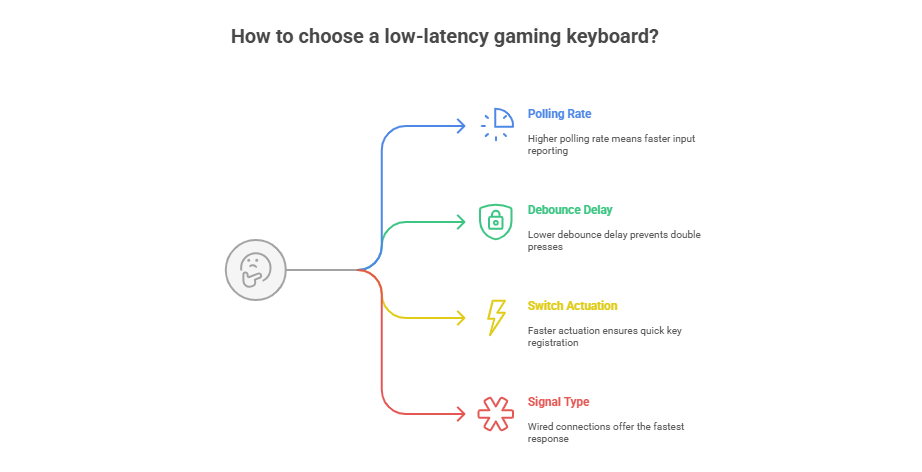
A low-latency gaming keyboard isn’t about RGB or extra macros. It’s about raw response. Here’s what actually affects your in-game timing:
Mechanical vs Optical
When it comes to raw reaction speed, mechanical keyboards still dominate everyday gaming, but optical and Hall Effect switches are changing the game.
- Mechanical switches: Metal contacts close when you press a key. Reliable and satisfying, with latency typically between 1 and 5ms. The most popular choice for both gaming and typing.
- Optical switches: A light beam detects the keypress instead of physical contact. No debounce needed, no mechanical wear. Latency drops below 1ms. Razer Huntsman and Corsair OPX use this technology.
- Hall Effect switches: Magnetic sensors replace physical contact entirely. Zero chatter, zero wear, and latency as low as 0.1–0.3ms. Wooting and many budget Chinese brands now use Hall Effect switches. Consistency across millions of keypresses is their biggest advantage over optical.
- Membrane keyboards: A rubber dome registers each keypress. Latency runs 15–25ms on average. Acceptable for casual typing, but a clear disadvantage in any gaming scenario.
Wooting Keyboard Latency Test
Wooting keyboards use Lekker analog switches, Hall Effect sensors that detect how far you press a key, not just whether you pressed it. This gives you analog precision similar to a controller trigger with actuation latency below 0.5ms.
The Rapid Trigger feature makes Wooting boards unique. It resets the actuation point the instant you begin lifting a key rather than waiting for full key release. This means faster re-presses and lower effective latency in rhythm games and shooters like Valorant and CS2.
If low latency is your priority, Wooting is the benchmark every other keyboard gets measured against.
Hall Effect & Optical Switches
Hall Effect switches use magnetic sensors instead of mechanical contact. That means no wear, no chatter, and virtually zero latency. In real-world hall effect keyboard latency tests, they perform nearly identically to optical switches, perfect for long gaming sessions with consistent performance.
Combine that with optical actuation (like Razer Optical or Corsair OPX), and you get the best keyboard latency for gaming, smooth, accurate, and durable.
Real-World Testing: How Fast Are They Really?
When you run a keyboard switch latency test using a browser-based tool or your in-game input logs, you’ll notice this pattern:
| Keyboard Type | Average Latency | Notes |
|---|---|---|
| Optical (Razer Huntsman V3 Pro) | ~0.2 ms | Light-based actuation |
| Hall Effect (Wooting 60HE+) | ~0.5 ms | Analog precision |
| Mechanical (Cherry MX Speed) | ~1–3 ms | Excellent all-rounder |
| Membrane | ~15–25 ms | Noticeable lag |
These aren’t marketing claims, they’re real measurements from click speed tests, keyboard latency tests done by hardware reviewers and pro players. The difference may sound small, but in gaming, microseconds decide outcomes.
Wired vs Wireless Keyboard Latency: What Really Matters
Latency is the hidden delay between pressing a key and seeing it on your screen, and when you go wireless, every millisecond counts. The truth? Modern wireless keyboards have improved massively, but not all are built equally. If you’re serious about gaming or fast typing, understanding wireless keyboard latency is the difference between smooth input and missed keystrokes.
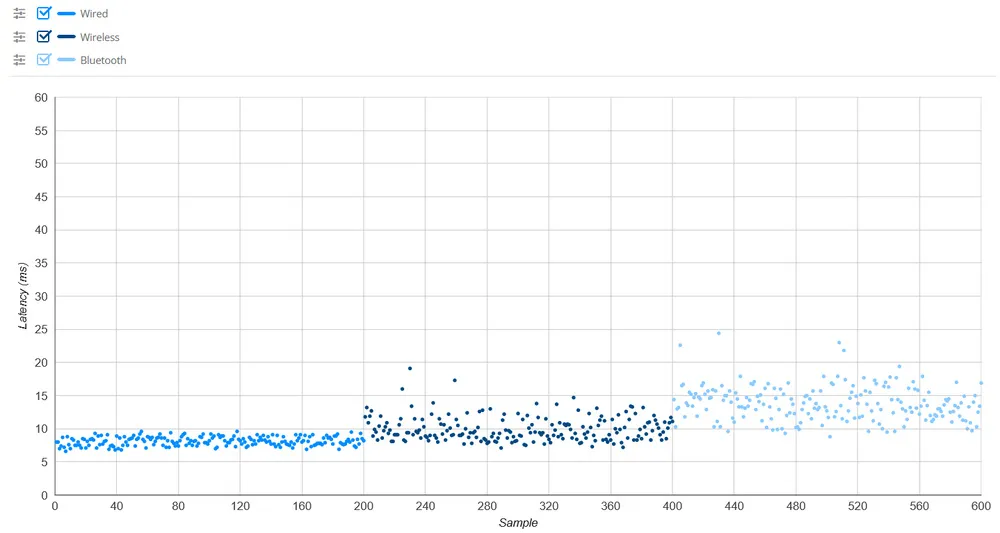
- Wired USB is the fastest and most consistent connection. Latency sits below 1ms and never fluctuates due to signal interference.
- 2.4GHz wireless matches wired performance in real-world use. Logitech Lightspeed, Razer HyperSpeed, and Corsair Slipstream all achieve under 1ms difference compared to wired. Keep the dongle plugged directly into a motherboard USB port, not a hub, and within 30cm of the keyboard.
- Bluetooth is the weakest option for performance. Polling rates on Bluetooth keyboards typically run at 125Hz or 250Hz, adding 4–8ms of baseline delay before any other factors. Bluetooth 5.0 LE improves this, but still cannot match a dedicated 2.4GHz dongle.
- The practical rule: Use wired or 2.4GHz for gaming. Use Bluetooth only when portability matters more than performance.
Quick Tips to Reduce Wireless Input Lag
- Plug the dongle directly into a motherboard USB port — USB hubs add latency and interference.
- Keep line of sight between your keyboard and receiver — obstacles reduce signal strength and increase drop rate.
- Turn off nearby Bluetooth devices — they compete on the same 2.4GHz frequency band.
- Replace weak batteries immediately — low voltage increases transmission delay before the keyboard dies completely.
- Update your keyboard firmware — manufacturers regularly release updates that reduce debounce time and improve polling stability.
- These small adjustments can shave off milliseconds, and in gaming, milliseconds decide everything.
Benchmark & Technical Analysis
When people compare keyboards online, they often rely on hype, but real latency data tells the truth. Benchmarking your keyboard isn’t about guessing; it’s about measuring milliseconds that separate a quick response from a missed action.
Keyboard Latency Test (RTINGS & Benchmark Insights)
If you’ve ever checked keyboard latency test RTINGS results, you’ll notice how small design differences cause big performance gaps. A mechanical board running at 1000 Hz may score 1.5 ms, while an optical model using light-based actuation can hit 0.2 ms.
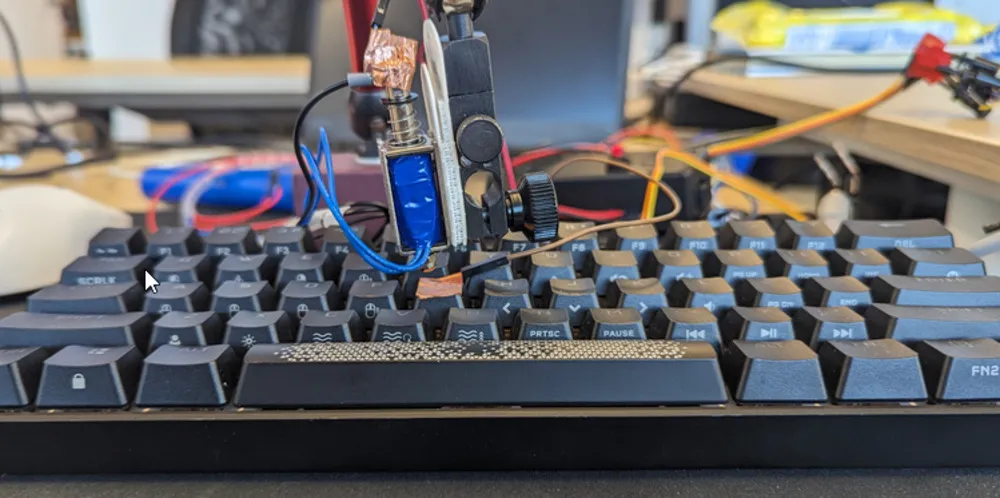
These micro-delays may sound minor, but for eSports pros and speed typists, that’s the line between precision and frustration. RTINGS and similar benchmarking sites use high-speed cameras and signal analyzers to record the time from actuation to on-screen response, giving a fair comparison across brands.
Mechanical Keyboard Latency Test
Mechanical keyboards are beloved for their feel, but latency varies by switch type. Linear switches like Cherry MX Speed or Kailh Silver trigger faster than tactile ones because they require less travel distance. During a mechanical keyboard latency test, results often fall between 2–8 ms, depending on polling rate and debounce delay.
If you’re a competitive gamer, that difference matters. It’s the comfort of mechanical feedback paired with the responsiveness you need for fast decision-making.
Hall Effect Keyboard Latency Test
Hall Effect switches replace physical contact with magnetic sensors, no bounce, no friction. That means zero mechanical chatter and nearly instant signal detection. In a Hall Effect keyboard latency test, numbers usually land around 0.1–0.3 ms, rivaling top optical boards.
Gamers on Reddit’s Hall Effect keyboard latency test threads often rave about consistency: every press feels the same, even after months of play. For technical users, the appeal isn’t just speed, but it’s durability and the ability to fine-tune actuation distance digitally.
Wooting Keyboard Latency Test
Then there’s Wooting, a brand that changed the conversation around latency. Their analog Lekker switches read pressure through magnetic sensors, allowing the firmware to register a press the instant it crosses the threshold. A Wooting keyboard latency test often records sub-0.5 ms response times faster than most human reactions.
But what really sets it apart is software calibration. Wooting’s Rapid Trigger lets you customize actuation mid-press, reducing latency even further when you lift and repress a key, perfect for rhythm games and shooters where milliseconds matter.
Interpreting Keyboard Latency Test Results
When analyzing your keyboard latency test results, don’t focus on one number alone. Look at average latency, consistency under load, and debounce performance. Some boards spike under stress or multitasking, while others remain stable.
A keyboard showing steady 0.8–1.2 ms latency across sessions is far more reliable than one that occasionally drops to 0.2 ms but spikes to 10 ms under load. Stability builds trust, and that’s what professionals care about most.
Keyboard Latency Ranking — Finding the Fastest Keyboards
When milliseconds decide the outcome, knowing how different keyboards rank by latency really matters. Gamers, typists, and professionals all want the same thing: a keyboard that reacts instantly. Keyboard latency ranking helps you see which models deliver that real-time experience.
Let’s break down what a “good” latency looks like, how 100 ms feels in real use, and which keyboards top today’s charts.
What Is a Good Keyboard Latency?
A good keyboard latency is anything that feels instant to the human hand.
For most players and fast typists, that means a delay under 10 milliseconds.
At that range, the keypress registers almost the moment you touch it, no visible lag, no missed inputs.
Here’s a quick guide:
| Latency Range | Performance Feel | Ideal Use |
|---|---|---|
| 0–5 ms | Instant and crisp | Pro gaming, eSports |
| 5–15 ms | Fast & responsive | Typing, creative work |
| 15–30 ms | Noticeable delay | Casual use |
| > 30 ms | Lag is visible | Not recommended for gaming |
If your keyboard falls below 10 ms, you’re already in the elite performance zone.
Is 100 ms Keyboard Latency Good?
Let’s be honest, no, 100 ms is not good for gaming or serious work. That delay equals a tenth of a second, which feels sluggish during fast reactions. In shooters, racers, or rhythm games, that can mean your action lands a frame too late to lose accuracy or timing.
For casual typing, it’s tolerable but still noticeable. If your latency hovers near 100 ms, try switching to a wired or 2.4 GHz connection, updating firmware, or enabling a 1000 Hz polling rate to cut that delay dramatically.
Keyboard Latency Ranking 2025
Here’s a list of the fastest keyboards tested for real-world input delay, combining polling rate, debounce time, and actuation speed.
| Rank | Keyboard | Switch Type | Polling Rate | Avg Latency | Connection |
|---|---|---|---|---|---|
| 1 | Razer Huntsman V3 Pro | Optical Analog | 8000Hz | 0.2ms | Wired |
| 2 | Corsair K100 RGB OPX | Optical | 8000Hz | 0.5ms | Wired |
| 3 | Wooting 60HE+ | Lekker Analog | 1000Hz | 0.5ms | Wired |
| 4 | SteelSeries Apex Pro TKL 2024 | OmniPoint 2.0 | 1000Hz | 0.7ms | Wired |
| 5 | Logitech G Pro X | GX Red Lightspeed | 1000Hz | 1ms | 2.4GHz |
Each of these models is fine-tuned for competitive gaming, offering virtually no perceivable lag. Optical and analog switches dominate the top ranks because light-based actuation eliminates mechanical contact delay.
FAQ
Does keyboard latency affect typing, not just gaming?
Yes. Fast typists working above 80 words per minute notice inconsistent latency because keypresses start outpacing the keyboard’s polling cycle. If your typing feels slightly behind your fingers, latency is likely the cause.
What polling rate should my keyboard run at?
1000Hz is the standard for gaming keyboards and gives a 1ms maximum input window. 8000Hz keyboards exist and reduce this to 0.125ms, but the difference is imperceptible to most users. Anything below 500Hz starts introducing noticeable delay for fast typing and gaming.
Does debounce time affect latency?
Yes. Debounce time is a firmware delay that prevents a single keypress from registering twice. Most keyboards set this between 5–10ms. Gaming keyboards reduce it to 0.2–1ms. High debounce time is one of the most overlooked causes of keyboard input lag.
Is a Hall Effect keyboard worth buying for lower latency?
Hall Effect keyboards deliver 0.1–0.3ms actuation latency and never wear out mechanically. If you play competitively or type for long hours daily, the consistency and durability justify the cost over a standard mechanical keyboard.
Can I reduce keyboard latency without buying a new keyboard?
Yes. Switch from Bluetooth to a wired or 2.4GHz connection. Plug directly into a motherboard USB port. Update your keyboard firmware. These steps alone can reduce latency by 5–20ms, depending on your current setup.

PollingRateTester.com provides browser-based testing tools for measuring mouse DPI, polling rate, latency, and other device performance metrics. All tools are tested on real hardware, including USB and Bluetooth mice and high-refresh-rate monitors, to ensure accurate and repeatable results.
The website is maintained by a technical team that regularly updates tools and guides in response to browser, sensor, or firmware changes to keep measurements consistent, precise, and transparent.

This is the ultimate guide to keyboard lag – talk about pressing buttons for info! Who knew milliseconds could be so fun to read about? Seriously though, the comparison between wired and Bluetooth is hilarious – Bluetooths like Hey, Ill get there eventually! while 2.4GHz is just Born to be fast. And Wooting? Im not just fast, Im *aggressively* fast with settings! But at the end of the day, its all about finding the keyboard that doesnt make you feel like youre playing a game of Guess how long Ill wait. Keep up the fantastic deep-dive into the world of twitchy typing!
Very well presented. Every quote was awesome and thanks for sharing the content. Keep sharing and keep motivating others.
A professionally delivered point that adds structural clarity.
Good day! Do you use Twitter? I’d like to follow you if that would be ok.
I’m definitely enjoying your blog and look forward to new posts.
i enjoy reading this great article, i have shared it many times on my website and started following you, Do you post more often ?? Thank you